
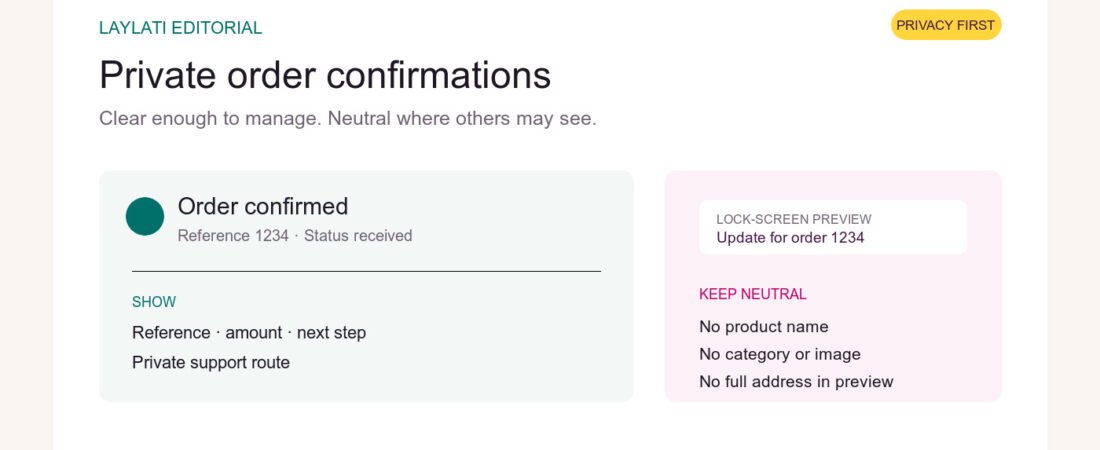
An order confirmation has one job before it has any other: remove doubt. The customer should know that the order was received, what happens next, and where to ask for help. For a private purchase, the message has a second job. It must confirm enough without repeating sensitive details in every inbox preview, lock-screen notification, or shared device.
That balance is not achieved by making the confirmation vague. A weak message creates support questions and delivery errors. A careful one separates the information needed to manage the order from the wording visible to anyone nearby.
Start with certainty, not promotion
Baymard Institute’s order-confirmation research says the confirmation step must first make clear that the order was placed and provide the essential order details. Extras can follow, but they should not replace the receipt, delivery expectation, or support path.
That ordering matters. A customer who has just paid or selected a payment method should not have to scan a discount banner to find the order number. The first screen and the first lines of the email should answer four questions: Was the order received? What is the reference number? What is the payment status? What happens next?
Keep the subject line and notification preview neutral
The most exposed part of an order email is often not the message body. It is the subject line, sender name, and preview text shown on a phone lock screen or shared computer. Those fields should use ordinary retail language.
A practical subject line is simple: “Your Laylati order is confirmed” or “Update for order 1234.” It does not need a product name, category, image, or promotional description. SMS and messaging notifications should follow the same rule: order reference, status, and a secure link are enough.
Neutral wording should not disguise who sent the message. The customer still needs to recognise Laylati and distinguish a legitimate order update from spam. Privacy comes from limiting unnecessary detail, not from creating an unfamiliar sender.
Show the useful details in the right place
On the private confirmation page, the customer can reasonably expect a fuller summary. It should show:
- the order reference and date;
- the total amount and the currency used for settlement;
- the selected payment method and its current status;
- the delivery city or a carefully masked address summary;
- the next operational step, such as review, confirmation, or dispatch;
- a direct route to private support.
The full delivery address, phone number, and product detail may be necessary inside the secured order record. They do not need to be repeated in the email subject, notification preview, or every follow-up message. A secure account page or direct support channel is the better place for corrections.
Use data minimisation as an editing rule
SDAIA’s Minimum Personal Data Determination Guideline explains the data-minimisation principle in practical terms: personal data should be adequate and limited to what is necessary for the stated purpose. The guidance is not an order-email template, and this article is not a legal compliance opinion. It does provide a useful editorial test.
For every field in a confirmation, ask why it is there. The courier needs an address. The customer needs an order reference. Support may need a phone number. A lock-screen preview does not need all three. The purpose should decide the amount of detail.
Separate the receipt from marketing
An order confirmation is a service message. It should not become a crowded catalogue immediately after the customer has made a private purchase. Baymard’s research allows room for useful post-purchase actions, but the order summary and delivery information remain the primary function.
For Laylati, restraint is the stronger choice. A link to care guidance, discreet packaging information, or order support is more useful than a wall of unrelated products. It keeps the message calm and reduces the chance that a sensitive product image appears in an email preview.
Make corrections easy before dispatch
The confirmation should tell the customer how quickly to report an address, product-number, or phone error. It should also explain that a change may no longer be possible after dispatch. This is operational clarity, not threatening fine print.
A neutral support link such as “Review order details” or “Ask privately” is clearer than asking the customer to reply with the entire order in the subject line. Support should be able to identify the order from the reference number and then confirm sensitive details inside the private conversation.
Trust continues after checkout
DHL’s 2026 ecommerce reporting continues to put trust, delivery, and returns at the centre of the purchase decision. The confirmation message is where those promises become operational. If the message is late, unclear, or overexposed, the customer feels the gap immediately.
Laylati’s standard should be straightforward: clear confirmation page, neutral notification, accurate order status, and a private route for corrections. The customer should not have to choose between understanding the order and protecting the purchase.
Before completing an order, review Laylati’s payment information, shipping and delivery guidance, discreet packaging standard, and privacy notice. If a detail needs clarification, use private order support before dispatch.