
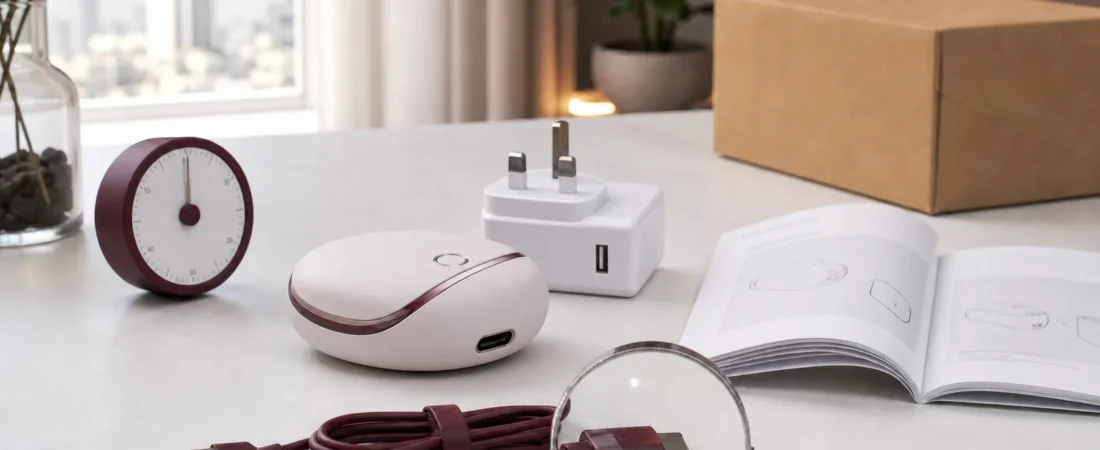
A USB cable in the box does not answer every charging question. It tells you how one connector reaches the device. It may not identify the correct wall adapter, accepted input, charging time, battery type, indicator behaviour, or whether the charging port must remain dry.
Those details belong on the product page or in the exact manual. If they are missing, pause before trying a spare phone charger simply because the plug fits. Connector shape and electrical compatibility are not the same thing.
This guide applies to small rechargeable private wellness products and powered accessories. It is not a repair manual and does not replace manufacturer instructions. Its job is to show which facts should be confirmed before first charge, travel, storage, or replacement-cable use.
Why the charger deserves its own check
Official product-safety notices continue to focus on chargers, batteries, and labelling. A UK Office for Product Safety and Standards recall published in May 2025 concerned a lithium-ion charger with unsafe construction and inadequate marking. The U.S. Consumer Product Safety Commission has separately warned against using loose 18650 lithium-ion cells outside protected battery packs and against inappropriate chargers.
Those notices are not evidence that a Laylati item has the same design or risk. They show why a shopper should identify the actual battery and charging instructions rather than importing assumptions from another device.
1. Match the instructions to the exact product
Start with the product number, variant, and manual. A family of products may share a name while using different connectors, batteries, or charging indicators. Compare the model shown on the listing, box, device, and instructions before connecting power.
Laylati’s product-details guide explains why the item, photographs, and included parts should agree. For powered products, add five specific lines to that comparison: input requirement, cable type, adapter requirement, full-charge indicator, and stated charging time.
2. Identify whether the battery is built in or replaceable
Do not assume that every rechargeable device contains the same battery chemistry. The listing or manual should identify whether the battery is built in, whether it can be replaced by the user, and what to do if it becomes damaged or reaches the end of its service life.
A built-in battery should not be opened simply to inspect the cell. A product using a removable battery should state the exact type and orientation. The CPSC warning about loose 18650 cells is useful here: industrial cells removed from protected packs are not a casual substitute for a consumer battery.
If the battery type is absent from the documentation, ask support. Do not use appearance, weight, or a marketplace comment to identify it.
3. Separate the cable from the wall adapter
“USB rechargeable” may mean the cable is included while the wall adapter is not. Check both ends of the cable and the input printed in the manual. Then confirm whether the manufacturer permits a standard USB port, a specific adapter output, a computer port, or another source.
USB-IF documentation shows why the connector alone is an incomplete description. USB-C cables can carry different power capabilities, and compliant USB-C-to-USB-C cables use power markings such as 60W or 240W. A small device may request far less power, but the broader point remains: a familiar connector does not make every cable or adapter equivalent.
Use the supplied cable when the manual requires it. If a replacement is needed, match the connector and stated electrical requirement rather than choosing only by colour, length, or price.
4. Inspect the cable, port, and adapter before charging
Look for bent contacts, corrosion, cuts, loose insulation, cracked adapter cases, dark marks, or a connector that no longer sits correctly. Stop if the device, cable, or adapter shows visible damage or an unusual smell. Do not hold a loose connection in place while charging.
Parcel damage can reach the power accessories even when the main item looks intact. If the outer box arrived crushed or wet, use Laylati’s parcel-condition checklist before plugging anything in.
5. Keep the charging port dry
Water-resistant, rinseable, and submersible are not interchangeable descriptions. Even when the main body has a stated water-protection level, the manual may require the charging port, magnetic contacts, cap, or connector to be completely dry before power is connected.
After cleaning, allow the item to dry as directed. Do not insert a cable to test whether the port is dry. Do not use direct heat to speed up drying unless the manufacturer specifically allows it. Laylati’s care and storage guide provides a general routine, but the exact manual takes priority.
6. Choose a visible, stable charging location
Charge on a stable surface where the device and cable can remain uncovered and easy to inspect. Keep the setup away from sinks, wet towels, direct sun, heaters, and places where the cable can be pulled or crushed.
Follow the stated charging time and indicator. If the instructions say to disconnect after charging, do so. Do not cover the device with clothing or place it inside a closed storage bag while connected. If it becomes unusually hot, swollen, distorted, noisy, or odorous, disconnect only if that can be done safely and stop using it pending qualified advice.
7. Learn the indicator and travel-lock behaviour
A blinking light can mean charging, low battery, connection error, or travel lock depending on the product. The product page should not leave the shopper to decode this by trial and error. Record what each colour or pattern means and how the device confirms a full charge.
If the product has a travel lock, learn how to enable it before packing. A lock prevents accidental activation; it does not change airline, courier, or battery-transport rules. Check the current carrier requirements separately before travel.
8. Store the cable with the device record
Once charging is complete, let the product cool and dry as directed before storage. Keep the cable loosely coiled rather than sharply folded, and store it where it will not be confused with a visually similar lead from another product.
Keep the model number, manual, cable description, and order record together. This makes it easier to identify a suitable replacement or describe a charging problem without exposing private order details. Browse Laylati’s pumps and accessories collection and open the individual product page before assuming that one cable, controller, or powered part works with another.
An eight-point first-charge check
- Model: Do the product, box, listing, and manual match?
- Battery: Is it built in or user-replaceable, and is the type identified?
- Cable: Is the supplied or approved connector clear?
- Adapter: Does the manual state the acceptable input and power source?
- Condition: Are the device, port, cable, and adapter undamaged?
- Dryness: Is the port fully dry and prepared as instructed?
- Indicator: Do you know the charging, full, error, and lock signals?
- Storage: Can the device and its correct cable be kept together after charging?
If one of these facts is missing, use private order support before connecting power. A concise model-specific answer is more useful than a universal charging claim.