
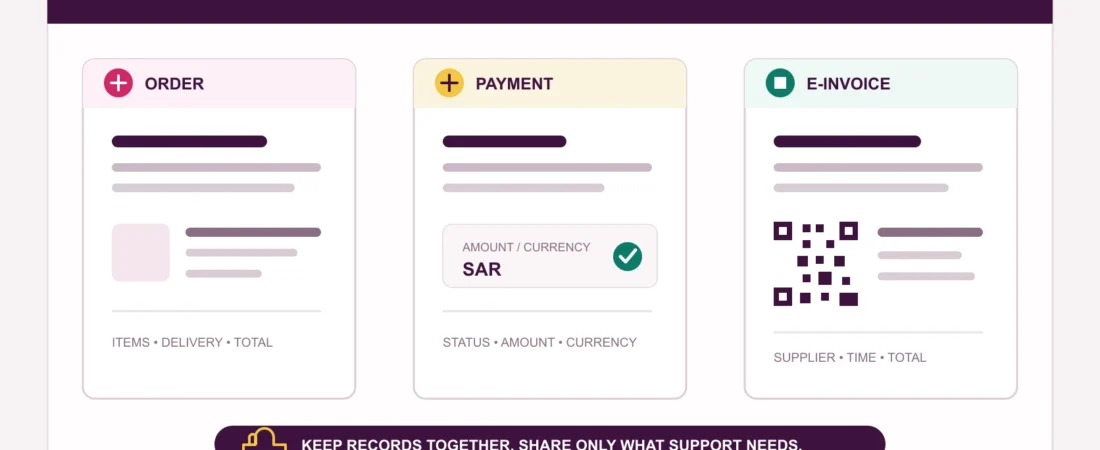
The first message after checkout is useful, but it is not always the final document you will need.
An online order can produce several records: an order confirmation, a payment notification, a delivery update, and an invoice. They may repeat the same total, yet each answers a different question. When a refund, warranty request, delivery dispute, or price query appears later, the distinction matters.
The subject is timely in Saudi Arabia. On 24 July 2026, ZATCA announced the twenty-fifth wave of the Integration Phase of e-invoicing. The announcement is directed at selected taxpayers, not shoppers, but it is a useful reminder that a genuine electronic invoice is a structured business record rather than any email or screenshot labelled “receipt.” This article is practical buyer guidance, not tax or legal advice, and it does not claim that Laylati is VAT-registered or that a particular Laylati document is a ZATCA-compliant invoice.
1. Start by naming each record correctly
An order confirmation records what the store accepted: the order number, items, quantities, selected options, delivery details, and total. It may be sent before payment is completed, especially when the payment method is cash on delivery or requires a later step.
A payment record comes from the store, bank, wallet, card provider, or payment processor. It helps show whether money was authorised, captured, refunded, reversed, or still pending. It does not replace the store’s itemised order record.
An electronic invoice has a more specific meaning. ZATCA describes it as a tax invoice generated in a structured electronic format through electronic means. A paper invoice that was merely scanned or photographed is not, by that definition, an electronic invoice.
A simplified tax invoice is the type usually issued by a business to a consumer. Whether it is required in a particular transaction depends on the seller and the applicable rules. Do not assume that every order email is an invoice, or that every retailer is in the same tax position.
2. Match the document to the exact order
Begin with identity, not formatting. The order number or other reference should connect the document to the purchase you made. Then compare the product names, selected variations, quantities, unit prices, delivery charge, discount, and final total.
Private-wellness orders often contain products with similar names or photographs. A model number, size, material, colour, set composition, or accessory can separate one item from another. Laylati’s product-details guide explains which fields are worth checking before the order is placed.
If a later document shortens the product name, keep the original order confirmation beside it. The two records should make the purchase understandable together without requiring you to expose private product information publicly.
3. Compare the total, currency, and payment state
A total can change between the product page and checkout because of delivery, an applied discount, a quantity change, or another disclosed charge. The document you retain should make the amount you agreed to pay clear.
Check the currency as carefully as the number. If the storefront displays SAR but a payment provider settles in another currency, keep the checkout total, conversion disclosure, and payment record together. Do not reconstruct the conversion later from a current exchange rate; the relevant record is the rate and amount shown when the transaction was confirmed.
Also distinguish an approved payment from a completed one. “Authorised,” “pending,” “captured,” “refunded,” and “reversed” describe different states. Laylati’s payment-choice guide explains why the live checkout and final provider screen matter more than a payment logo elsewhere on a site.
4. Know what a simplified-invoice QR code can show
ZATCA’s guidance says a B2C simplified tax invoice includes a mandatory QR code when the issuing taxpayer is within the e-invoicing requirements. ZATCA also provides an electronic-invoice verification service that scans the QR code.
The Authority’s FAQ lists the minimum information shown when that QR code is scanned:
- the supplier’s name;
- the supplier’s VAT registration number;
- the invoice or note timestamp;
- the invoice or note total including VAT; and
- the total VAT amount.
That makes the QR code useful, but not a substitute for reading the visible document. It does not tell you, by itself, whether the product variation, delivery promise, return condition, or warranty description matches the order. Use the official verification route for the invoice data and the store records for the commercial details.
A random QR image, a payment link, or a code printed on packaging should not be treated as invoice verification simply because a phone can scan it.
5. Keep delivery records separate from the invoice
An invoice records the transaction. A delivery message records movement or handover. Save the courier name, tracking reference, delivery method, estimated date, and proof of delivery separately from the invoice.
This separation becomes useful when the payment is correct but the parcel is delayed, sent to the wrong address, or arrives damaged. The invoice can support the value and identity of the order; the tracking history supports the delivery timeline. Laylati’s guides to verifying tracking messages and checking a damaged or opened parcel cover those records in more detail.
6. Keep warranty and return information with the purchase
The Saudi Ministry of Commerce has previously called for warranty information and the product agent’s contact details to be included in the purchase invoice for relevant ecommerce goods. In practice, shoppers should keep every warranty statement, care instruction, return condition, and support route that was presented with the purchase.
Do not assume that an invoice creates a return right beyond the published policy, or that a return policy replaces a product warranty. They are different records for different questions. The Laylati guide to warranty, return policy, and paid protection separates those routes.
When a product has hygiene or opened-package conditions, keep the policy version that applied when you ordered. If the parcel arrives damaged, preserve photographs of the outer package and product condition before cleaning, assembly, charging, or use.
7. Store the record privately and in a format you can retrieve
A private order record may contain a name, phone number, delivery address, order reference, payment fragment, and product description. Keep it in an account or folder protected by a device passcode. Avoid saving it to a shared photo roll or forwarding it to a public group.
Use filenames that can be found later, such as the order date plus a shortened order reference. Keep the original email or downloadable document where possible; a screenshot can help, but it may omit the sender, attachment, timestamp, or full terms.
When requesting support, share only what is needed. An order reference and a precise question are usually more useful than a full screenshot containing an address and payment details. Laylati’s order-confirmation privacy guide explains what should stay neutral after checkout.
A 90-second post-checkout filing check
- Save the order confirmation with the exact items, options, quantities, and total.
- Save the payment state and the amount and currency actually presented.
- Keep the electronic invoice separately when one is issued.
- Compare the supplier, timestamp, total, and VAT information shown through the official QR verification route when applicable.
- Keep delivery tracking and handover evidence in the same private folder.
- Add the warranty, return conditions, care instructions, and private support route.
- Remove unnecessary personal details before sharing any document with support.
Good records should make a private purchase easier to resolve without making it less private. Review the live payment information, keep the order and invoice as separate documents, and use private order support when a reference, amount, or document type is unclear.
Sources
- ZATCA, criteria for Wave 25 of the E-Invoicing Integration Phase, 24 July 2026
- ZATCA, what e-invoicing is and the distinction between tax and simplified tax invoices
- ZATCA, electronic-invoice verification service
- ZATCA, minimum information shown when scanning a simplified-tax-invoice QR code
- Saudi Ministry of Commerce, ecommerce initiatives covering warranty information in purchase invoices