A delivery message is most convincing when you are genuinely waiting for a parcel. The order timing feels right, the sender mentions a missed delivery or an address problem, and the link promises a quick solution. That is exactly why the message deserves a separate check before you tap.
For a private order, the temptation to resolve the issue quietly and quickly can be even stronger. A safer routine is slower by only a minute: leave the message unopened, go to the store or carrier through a route you already trust, and compare the details there.
Do not use the message as your starting point
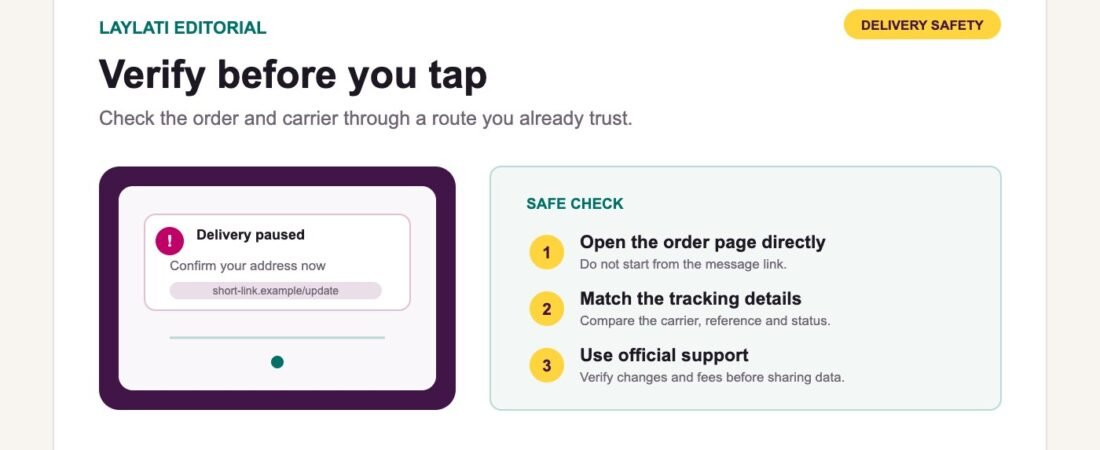
If a text or email says that delivery is paused, do not begin by opening its link. Open the store’s order page from a saved bookmark or type the store address into the browser. If the seller has provided a carrier name and tracking number, open the carrier’s official website or app separately and enter the number there.
This breaks the most common trap: letting the message decide which website you see. A copied logo, familiar colour, or convincing page title does not prove that the destination belongs to the store or courier.
Saudi Post | SPL gives similar advice in its fraud-awareness guidance. It asks customers to compare a shipment notification with their actual order details and to use SPL’s official website or app for payment and shipment services.
Match the message against the order
A legitimate update should make sense when compared with information you already have. Check the order reference, carrier, tracking number, delivery city, expected dispatch window, and the status shown in your store account or confirmation email.
A generic message with no usable reference is not automatically fraudulent, but it is not enough evidence to act on. The same is true when the message arrives before the store has marked the order as dispatched, names an unfamiliar courier, or describes a delivery attempt that does not appear in the official tracking history.
When the details conflict, contact the seller through the support link on its own website. Do not reply to the suspicious message or use the phone number printed inside it.
Read the full address, not just the label
On a phone, a long web address may be shortened or hidden behind a button such as “Update address.” Pressing and holding the link may reveal more of the destination, but the stronger check is still to avoid the link and navigate independently.
If you inspect it, focus on the registered domain immediately before the first single slash. Extra words before or after a familiar brand name can point somewhere else. Misspellings, unusual endings, URL shorteners, and strings of unrelated characters are reasons to stop. A padlock or https connection only means the connection is encrypted; it does not confirm that the site is genuine.
Saudi Arabia’s National Cybersecurity Authority provides the Tahqaq service to help citizens and residents assess links before visiting them. Access it from the NCA or Haseen service itself, not from a forwarded “verification” link.
Pause when the message creates urgency
Fraudulent delivery messages often turn a small operational issue into an immediate deadline: pay a minor redelivery fee, confirm the address within minutes, or lose the parcel. The amount may be deliberately small because a customer is less likely to question it.
Separate the delivery question from the payment request. First confirm that the parcel exists and that the official tracking page shows the same problem. Then check the store’s published delivery and payment process. A request for card details, account credentials, passwords, or a one-time code should never be treated as a routine address correction.
SPL states that its employees do not ask customers for passwords, card details, or other sensitive account information. It also advises customers not to share a delivery code until they are actually receiving the parcel.
Use delivery and verification codes at the right moment
A delivery code can help a courier confirm handover. It should not be sent in advance to a stranger who says it is needed to release, inspect, or reschedule a parcel. Keep the code private until the person and parcel are physically present and the handover details match.
The same boundary applies to bank one-time passwords and account verification codes. A store’s support team may ask for an order reference, but it should not need your card PIN, online-banking password, or a bank authentication code to check a delivery status.
What a careful private-order message should contain
A well-designed order update is recognisable without exposing the purchase. It can include the store name, a limited order reference, a plain status such as “dispatched” or “delivery update,” the official support route, and a link whose domain clearly belongs to the store or named carrier.
It does not need the product name, product image, full address, full phone number, or other sensitive detail in the lock-screen preview. Neutral wording protects privacy, while a clear sender and reference help the customer distinguish a real update from an imitation.
Laylati’s practical standard is to keep notification wording neutral and place the useful order detail inside the order or private support path. If a message looks different from that pattern, verify it before acting.
If you already opened the link
Opening a page does not always mean that information has been stolen. Close it, do not download anything, and return to the official store or carrier site independently. If you entered a password that you also use elsewhere, change it on the real service and on any account where it was reused.
If you submitted card details, a bank code, or authorised a payment, contact the bank or payment provider through the number in its official app, website, or on the card. Do not use a “fraud support” number supplied by the same message.
For a Laylati order, review the official shipping and delivery page, use private order support, and follow the address-correction and failed-delivery guide. The privacy notice and order-confirmation guide explain what a careful store message should reveal.