
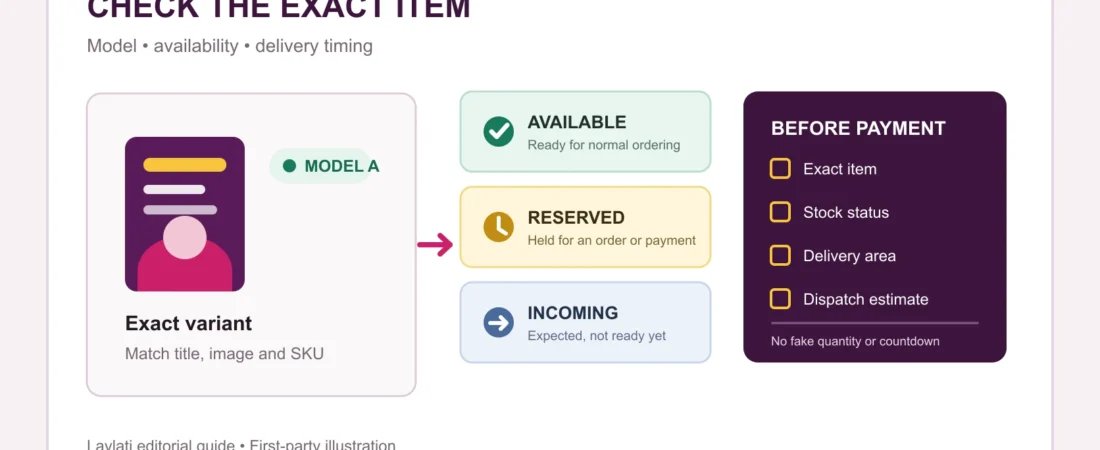
“In stock” looks like a simple promise. In practice, an ecommerce system may be tracking several different numbers: units physically recorded, units available for sale, units reserved for an order, units held while payment is pending, and stock expected to arrive later. Only one of those answers the shopper’s immediate question: is the exact item ready to be ordered now?
Current inventory guidance from Saudi commerce platform Salla separates total, available-for-sale, reserved, incoming, unavailable, and held stock. WooCommerce also distinguishes quantity tracking, stock status, backorders, and temporary holds for unpaid orders. The labels are operational, but they matter to shoppers because they can change what is available between a product page and checkout.
For a private order, the safest approach is to check the exact model, the displayed status, and the delivery estimate together. A green label alone does not explain every part of fulfilment.
1. Match “in stock” to the exact item
Availability should apply to the exact product, model, size, colour, bundle, or accessory selected. A parent product can remain visible while one variation is unavailable. A category can also contain several similar items with different stock states.
Start with the product name, model or SKU, selected option, and main image. Compare those details again in the basket. The product-details checklist explains which listing fields should be clear before payment.
2. Separate total stock from available-for-sale stock
Total stock is an internal count. It can include units already committed to another order, unavailable units awaiting inspection, or stock assigned to another market or location. Available-for-sale stock is the portion the store can currently offer through the selected sales channel.
This is why an internal inventory number is not automatically a shopper-facing promise. A responsible listing should present a usable status without exposing a misleading quantity. If the item is important or limited, confirm the exact model rather than relying on a broad category label.
3. Understand reserved and held stock
A unit may be reserved after an order begins, even before payment finishes. WooCommerce can temporarily hold stock for pending payment and release it when the configured window expires. Modern checkout systems can also reserve stock briefly while a shopper completes the checkout flow.
That means an item can appear available, then become unavailable if another order secures the remaining unit first. Adding an item to a basket should not be treated as a permanent reservation unless the store states that clearly.
4. Do not confuse incoming stock with ready stock
Incoming stock is expected but has not yet become available for sale. It may still be in transit, receiving, inspection, or stock-allocation work. A restock date can help with planning, but it is different from immediate availability.
If a page says “arriving soon,” “restocking,” or gives a future date, read the wording literally. Do not assume dispatch begins today. Ask whether the item is physically ready for the selected delivery area or whether the date is only an estimate.
5. Distinguish in stock, backorder, and preorder
An in-stock item is available for normal ordering. A backorder is usually accepted even though current sellable stock is unavailable; fulfilment waits for replenishment. A preorder is placed before a planned release or availability date. These are different buying conditions and should not share the same delivery expectation.
When backorders are allowed, the checkout may still accept payment. The ability to pay does not prove immediate dispatch. Look for a stated expected date and keep that wording with the order record.
6. Check the market and delivery location
Availability can vary by warehouse, branch, market, or delivery zone. Salla’s current multi-market inventory guidance reflects this operational reality, while IKEA Saudi’s public stock guidance reminds shoppers that availability changes and delivery options should be checked for the chosen location.
For a Saudi order, confirm that the status applies to the Saudi-facing listing and the address entered at checkout. A product available elsewhere is not necessarily available through the same delivery route.
7. Read stock status with the delivery estimate
“In stock” answers an inventory question. It does not, by itself, state a dispatch cutoff, courier collection time, delivery date, or successful first-attempt handover. Those details come from the delivery method and order processing terms.
Compare the stock label with the delivery window before payment. If the estimate changes later, keep the original and updated messages together. The delivery-date comparison guide shows which records are useful.
8. Confirm the final item and timing in the order record
After checkout, retain the order confirmation showing the product, selected option, price, delivery address, and timing. An order confirmation and an electronic invoice serve different record-keeping purposes; the order-confirmation guide explains the distinction.
If the listing and checkout do not agree, pause and ask one precise question. “Is this exact model available for dispatch to Riyadh now, or is it incoming or on backorder?” is more useful than asking only whether the category is available.
An eight-point availability check
- Confirm the exact model, option, bundle, and image.
- Read the shopper-facing status, not an unrelated total quantity.
- Do not assume a basket permanently reserves the item.
- Treat incoming stock as different from ready stock.
- Separate in stock, backorder, and preorder.
- Check that availability applies to your market and address.
- Read the stock label together with the delivery estimate.
- Keep the final product and timing in the order record.
Clear availability reduces uncertainty before payment. When one field is missing, use private order support to confirm the exact item and timing. You can also review current soft-touch forms, pumps and accessories, and the product-dimensions guide before comparing options.